ASK ABOUT THE RECORD YOU HAVE KEPT
AI migraine diary assistant.
Questions in your words.
When you want to explore the history you have recorded, Calmira’s optional AI assistant offers a conversational way to ask about it. Keep the original entries nearby and treat the response as something to check.
Download on the App StoreFor iPhone. Free to download. Optional in-app purchases.
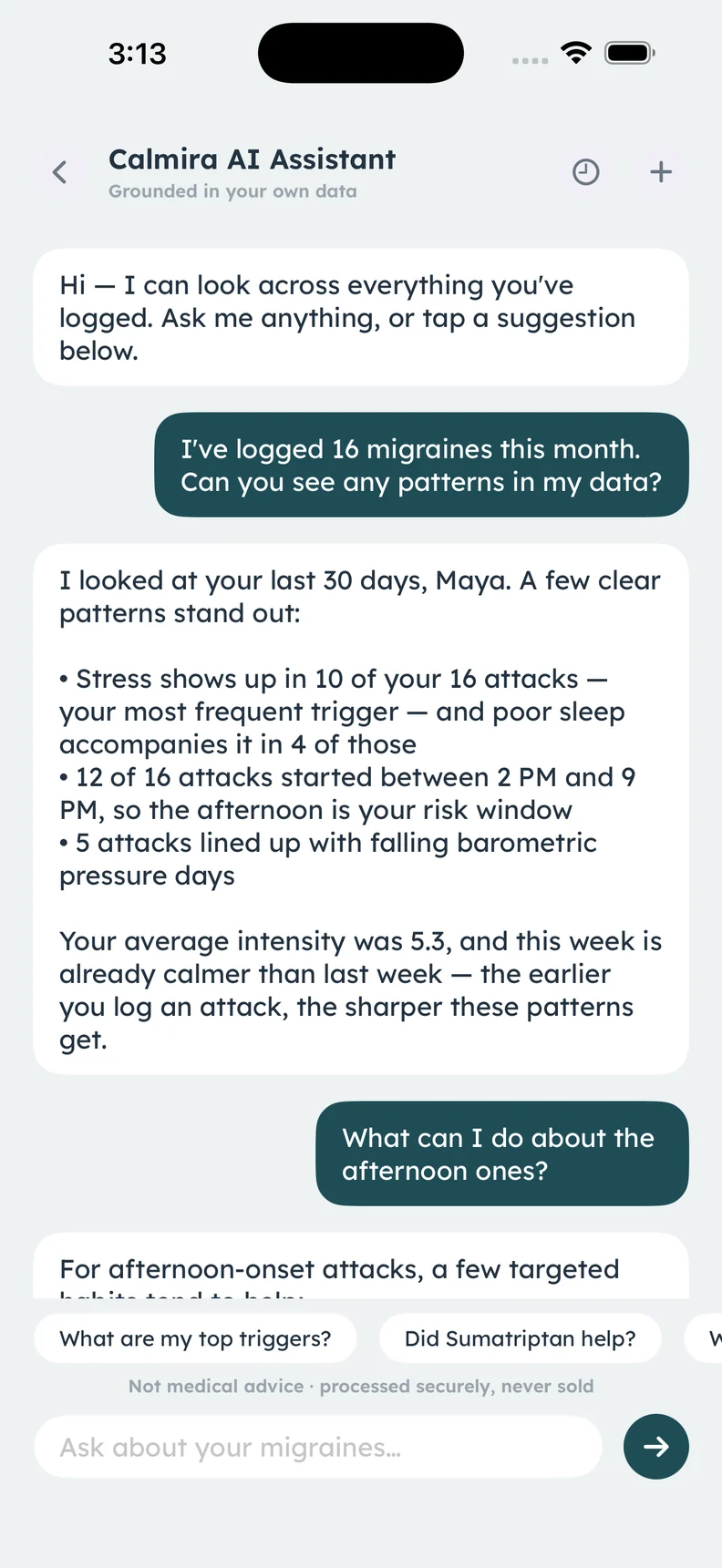
Real AI assistant screen. Conversation and figures are illustrative; answers are not medical advice.
A CLOSER LOOK
What it helps
you keep track of.
- Questions about your recorded history
- Diary, trend, and pressure context
- Responses in your app language
- Saved conversations for looking back
Start with a question about your entries
You might ask which possible triggers appear in the period you logged or what your recorded attack timing looks like. These are questions about a personal record. The assistant does not independently know about days or details you did not log, so missing information still matters.
Check the response against the history
AI can make mistakes or describe a pattern too confidently. Revisit the dates and entries behind an answer before relying on a summary. A fluent explanation is not a clinical assessment, and a possible pattern is not a confirmed cause. Keep uncertainty in any questions you bring to a clinician.
Understand the optional processing
The assistant processes a structured summary of your history separately from local diary storage. The app privacy policy describes this processing and the supporting services. Read the privacy information before choosing the feature, especially if you are deciding which diary functions you are comfortable using.
Keep care decisions with your healthcare professional
Use the assistant to explore recorded information or prepare questions, not to diagnose symptoms, choose a medicine, or change treatment. Saved conversations let you revisit what was said, but keeping an answer does not make it correct. A report or the original diary remains useful alongside the conversation.
ABOUT THIS FEATURE
A little more clarity.
Does the AI assistant replace a clinician?
Does the assistant run entirely on my phone?
KEEP THE PICTURE CONNECTED
Connect the rest of your diary.
Keep the detail, the context, and the conversation connected. Explore the tools and guidance that fit this part of your routine.
Understand Calmira’s data practices
Read Calmira’s full app privacy policy here, including local storage, optional AI processing, analytics, your choices, and website data practices.
Take a closer look In the appExplore recorded migraine trends
Review recorded attack timing, average pain, possible triggers, and longer-term diary trends in Calmira. Keep patterns grounded in your actual entries.
Take a closer look In the appPrepare a migraine diary report
Bring your recorded migraine history to an appointment. Calmira can create a PDF report of attacks, possible triggers, medicines, and diary trends.
Take a closer lookYOUR NEXT CHAPTER, WITH A LITTLE MORE CONTEXT
Start with today.
Let the picture build.
Your next entry doesn't have to be perfect. It just has to be yours.
For iPhone · iOS 17 or later
Free to download. Optional in-app purchases.