MORE THAN A PAIN NUMBER
Migraine symptom tracker.
Words for what you felt.
Pain is only part of the story you may want to remember. Calmira gives symptoms a place in the same entry, so you can keep your experience together without reconstructing it later.
Download on the App StoreFor iPhone. Free to download. Optional in-app purchases.
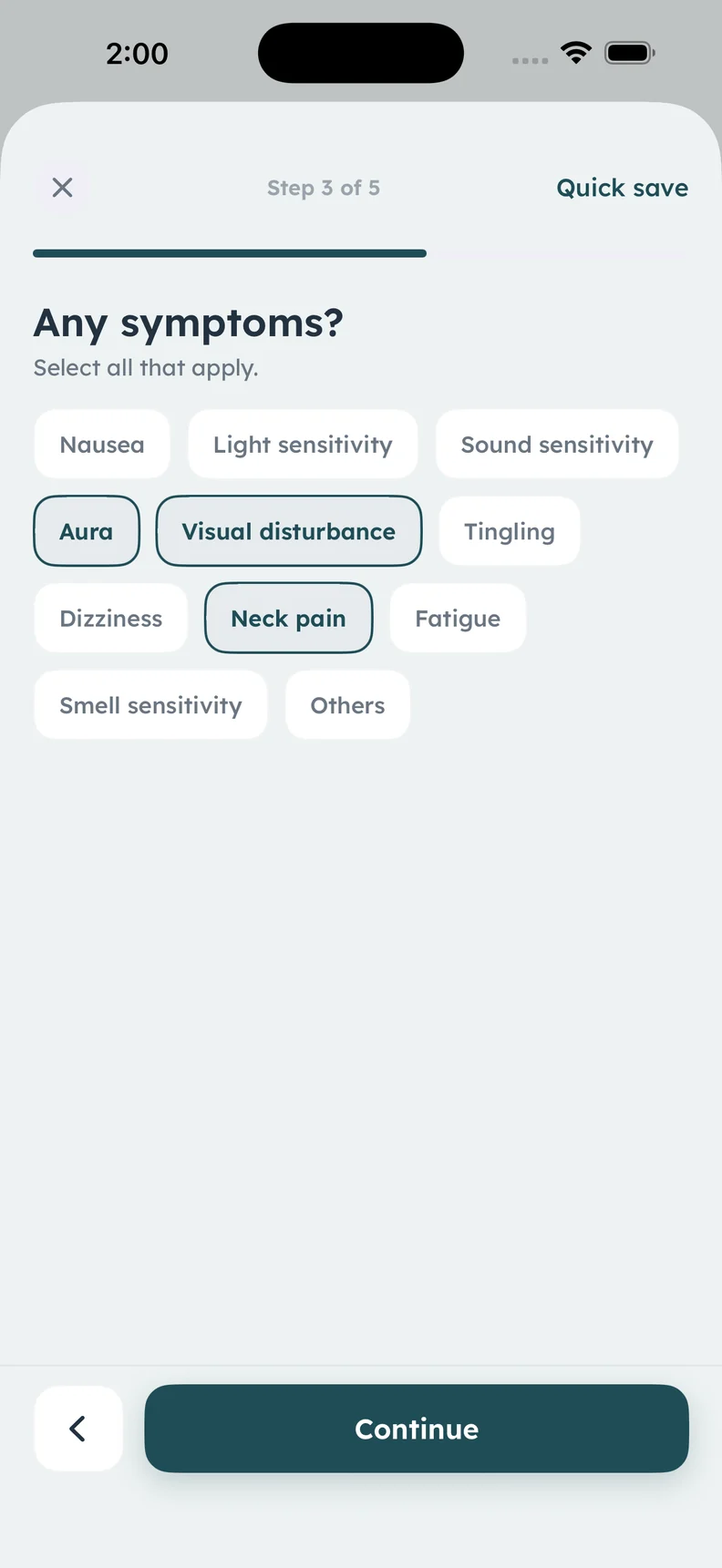
Actual symptom logging screen. Selections are illustrative, not a diagnosis.
A CLOSER LOOK
What it helps
you keep track of.
- Select the symptoms you noticed
- Record light, sound, or smell sensitivity
- Include nausea, dizziness, or fatigue
- Use your own words for additional detail
Select what matches your experience
The symptom screen includes options such as nausea, light sensitivity, sound sensitivity, aura, visual disturbance, tingling, dizziness, neck pain, fatigue, and smell sensitivity. Choose what you actually noticed. The options describe entries; they do not determine whether you have migraine.
Add the detail a tag cannot hold
A short note can preserve the difference between a label and your experience. For example, “bright room felt uncomfortable” may be easier for you to remember than a tag alone. You can use ordinary language rather than a medical term you are unsure about.
Keep symptoms alongside timing and pain
Symptoms make more sense when they stay connected to the date, start and end times, pain location, and medicine information you recorded. Returning to that entry can help you describe the sequence of a particular day instead of treating each symptom as an isolated fact.
Bring questions rather than conclusions
If you are unsure how to describe a symptom, write the uncertainty down and ask a qualified healthcare professional. A list in an app is not a diagnostic checklist, and an incomplete entry is not a failed entry. Calmira helps retain observations for a later conversation.
ABOUT THIS FEATURE
A little more clarity.
Can selecting symptoms diagnose migraine?
Do I need to select every symptom?
KEEP THE PICTURE CONNECTED
Connect the rest of your diary.
Keep the detail, the context, and the conversation connected. Explore the tools and guidance that fit this part of your routine.
Map pain location and intensity
Use Calmira’s head map and pain scale to record headache location and intensity, with symptoms, timing, and notes in the same migraine diary entry.
Take a closer look In the appKeep a migraine diary in Calmira
Keep a migraine diary on your iPhone with Calmira. Record attack timing, pain, symptoms, possible triggers, medicines, and notes in one place.
Take a closer look Practical guideMigraine Log Example: What to Record in One Entry
See a clearly fictional migraine log example and learn how to record timing, symptoms, medicines, impact, and uncertainty without filling every field.
Take a closer lookYOUR NEXT CHAPTER, WITH A LITTLE MORE CONTEXT
Start with today.
Let the picture build.
Your next entry doesn't have to be perfect. It just has to be yours.
For iPhone · iOS 17 or later
Free to download. Optional in-app purchases.